Find the One Thing All Your Replicas Share
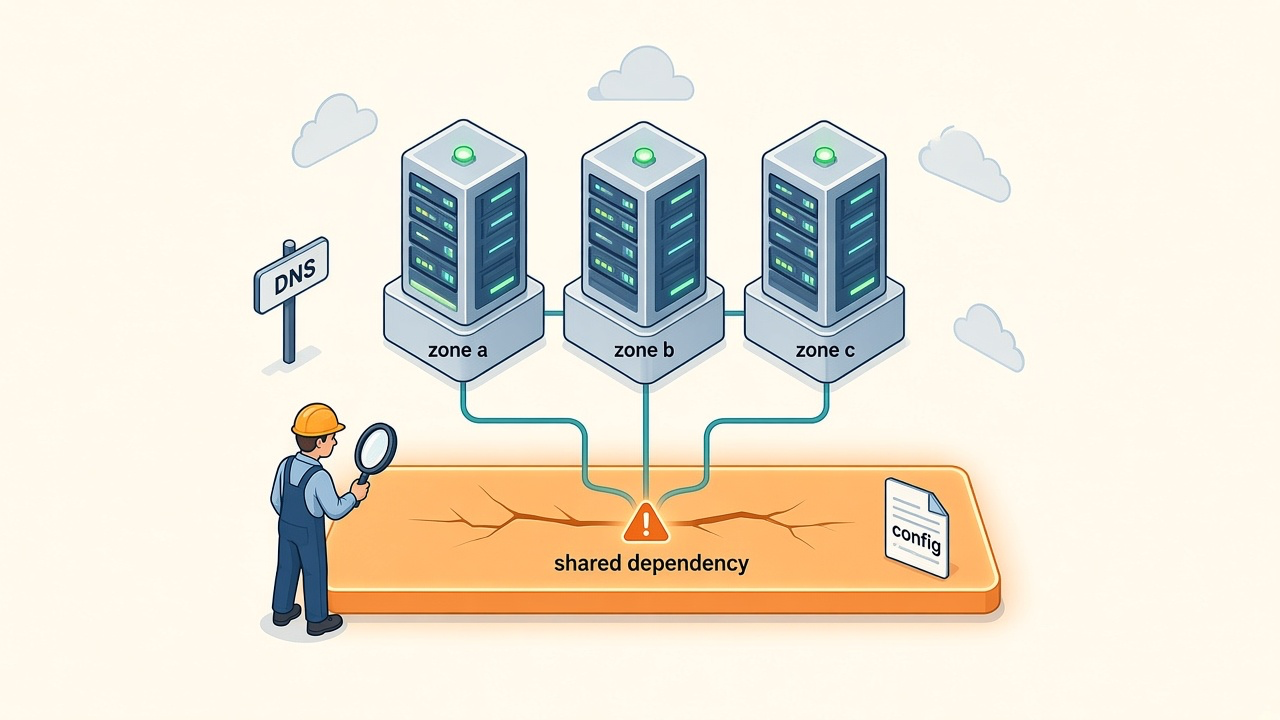
Look at the arrows, not the boxes. Every arrow on that diagram ends in the same place, and that place decides when all three replicas stop at once.
Most architecture reviews count boxes. Three replicas, three zones, a load balancer in front, and the reviewer nods. The count is real. It is also the wrong number. A service is available while at least one replica can serve, and every replica can serve only while everything it shares is up. The shared thing sets the ceiling. More replicas raise the floor under a ceiling that does not move.
Open the diagram for a service you run. By the last section you will have circled the box that sets its real ceiling, and each question that finds it comes with a public outage that proves it was worth asking.
TL;DR. Your availability is capped by the one thing every replica shares, not by how many replicas you run. Three replicas at 99% promise about 31 seconds of downtime a year. One shared dependency at 99.9% turns that into about 8.8 hours. Five questions find the shared box on your diagram. Ask where it has exactly one copy, what every replica reads at startup, what change reaches all of them at once, what keeps serving when the control plane fails, and what your vendors depend on. Circle the box that answers the most questions, and fix that one first.
Three replicas do not multiply your availability
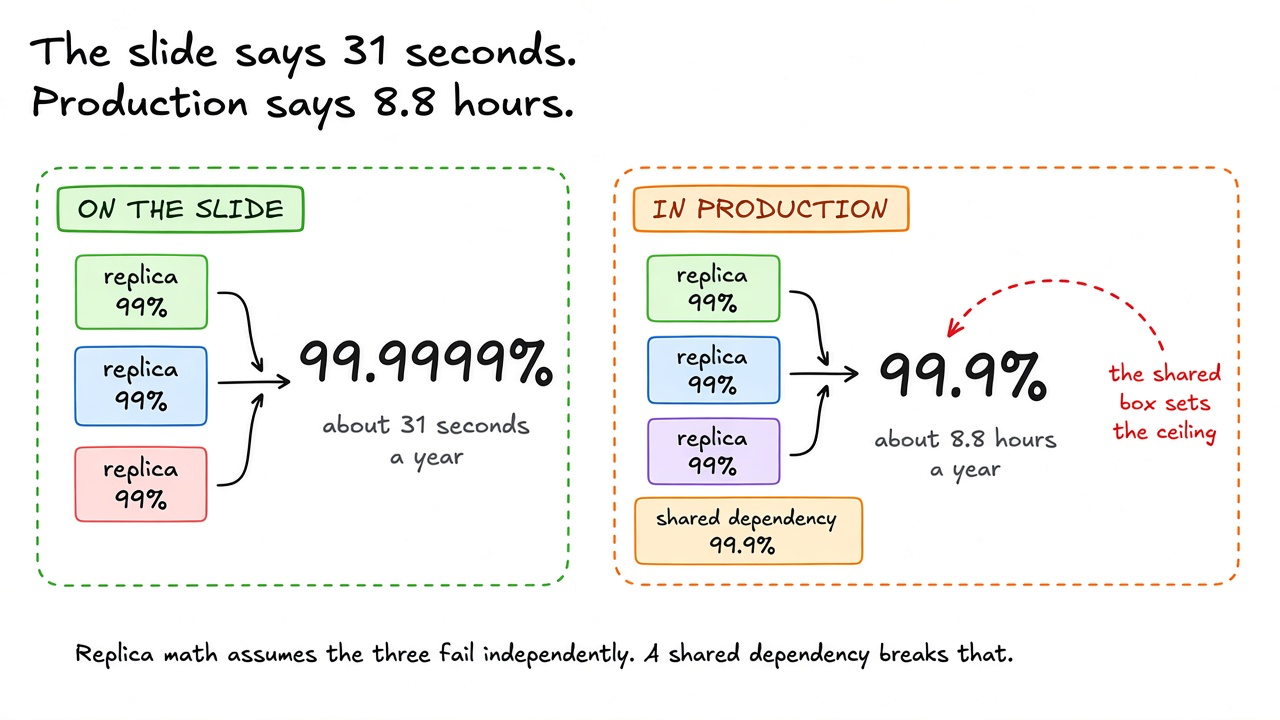
Start with the number on the slide. Each replica is up 99% of the time. Three of them fail independently, so all three are down together with probability 0.01 cubed, one in a million. The service is up 99.9999% of the time. That is about 31 seconds of downtime in a year.
Now add one dependency all three use, at 99.9%. The replicas cannot serve while it is down, no matter how many there are. The two numbers multiply. 0.999 times 0.999999 is about 0.999.
The service is now up 99.9% of the time. That is about 8.8 hours a year. The replicas still contribute 31 seconds. The shared dependency contributes the rest. A fourth replica changes the total by less than a ten-thousandth of a percentage point. The shared box owns the number.
func Availability(replica float64, n int, shared ...float64) float64 {
	a := 1 - math.Pow(1-replica, float64(n))
	for _, s := range shared {
		a *= s
	}
	return a
}
Availability(0.99, 3) returns 0.999999. Availability(0.99, 3, 0.999) returns 0.998999. The function assumes the replicas fail independently. That assumption is the whole argument. Two replicas that share a power feed, a DNS name, a config file, or a vendor do not fail independently. Their correlated failure is the shared dependency, whether or not your diagram draws it.
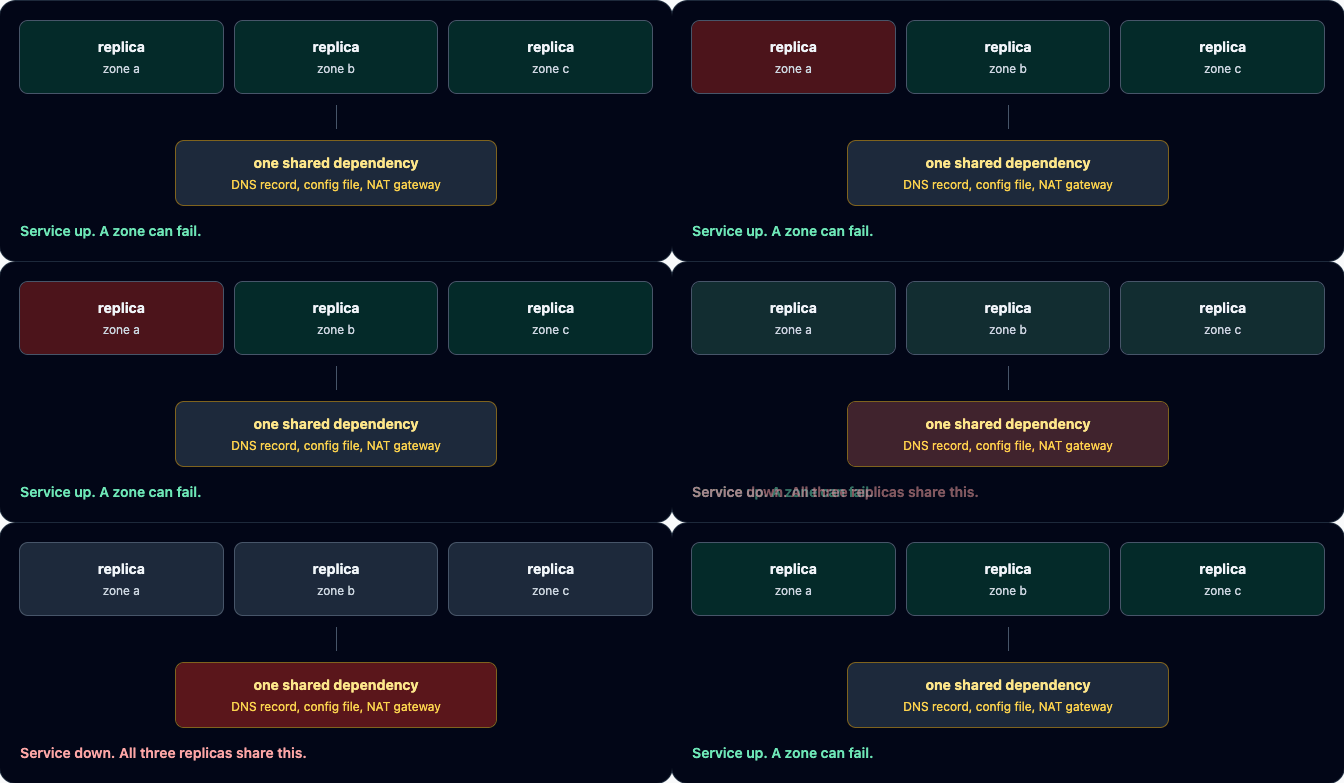
The animation is the same math in motion. A zone fails and the service stays up, because two replicas are left. Then the box underneath fails, and every replica goes dark together. No replica did anything wrong.
So the work is finding the shared box. The easiest one to find has exactly one copy.
Which box on your diagram has exactly one copy?
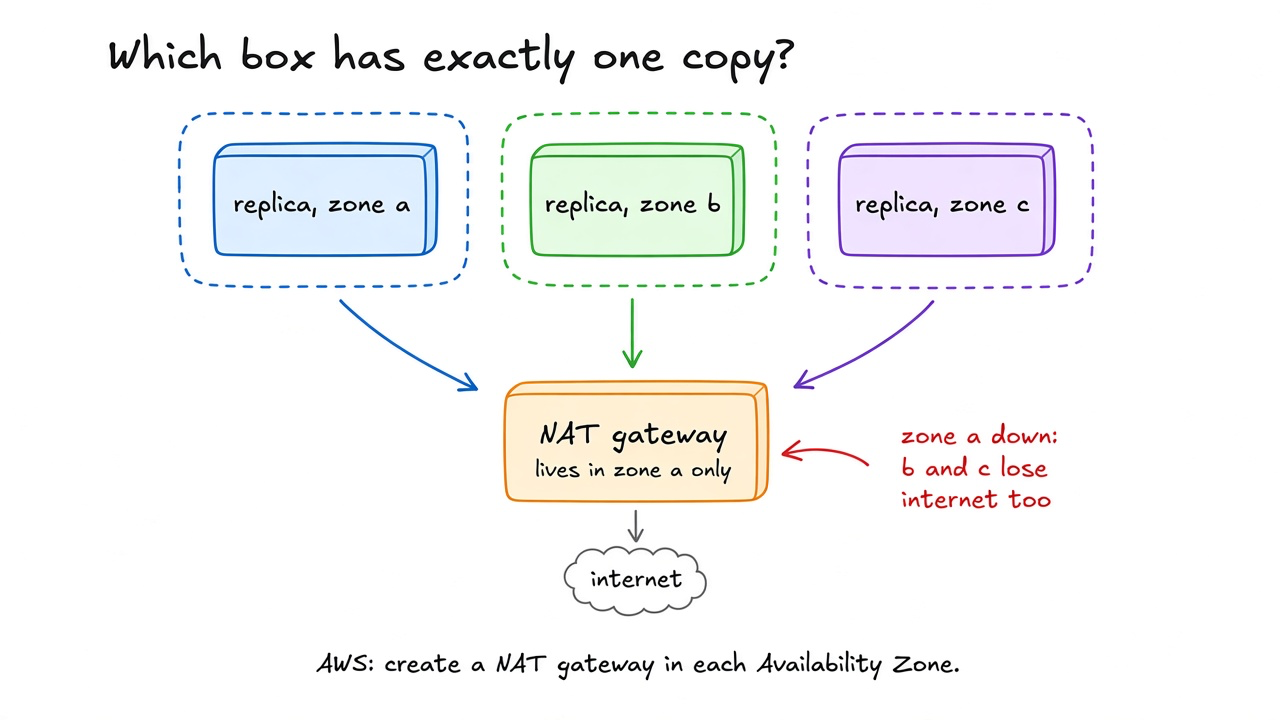
Run your finger along every arrow and stop at any box with a count of one. A single primary database. A single queue broker. A single load balancer with no peer. A single NAT gateway.
The NAT gateway is the case people miss, because it looks like plumbing. AWS documents a standard NAT gateway as zonal. It is created in one Availability Zone, and its redundancy lives inside that zone. The VPC guide says it plainly. If resources in several zones share one NAT gateway and that gateway's zone goes down, resources in the other zones lose internet access. The guide's fix is one NAT gateway per zone, with routes that keep each zone on its own gateway. AWS now also documents a regional NAT gateway mode. Check which one your route tables point at before you assume either.
The zones themselves are real failure domains. AWS describes each Availability Zone as one or more discrete data centers with independent power, cooling, and physical security, many kilometers from any other zone in the Region. So spreading replicas across zones is worth doing, and Kubernetes makes it a declaration.
spec:
  topologySpreadConstraints:
    - maxSkew: 1
      topologyKey: topology.kubernetes.io/zone
      whenUnsatisfiable: DoNotSchedule
      labelSelector:
        matchLabels: { app: checkout }
---
apiVersion: policy/v1
kind: PodDisruptionBudget
metadata:
  name: checkout
spec:
  minAvailable: 2
  selector:
    matchLabels: { app: checkout }
topologySpreadConstraints keeps the replica count in any two zones within one of each other, and DoNotSchedule refuses a placement that breaks that. topology.kubernetes.io/zone is the well-known label the Kubernetes docs recommend for it. The PodDisruptionBudget keeps voluntary evictions, such as a node drain, from taking you below two replicas. Use minAvailable or maxUnavailable in one budget, not both.
Both objects govern placement. Neither one knows what the pods do after they start. Three pods in three zones that route through one zonal NAT gateway still have one copy of their way out.
Zone spread fixes where replicas run. It does nothing about a name every replica looks up.
The DNS record every zone resolves
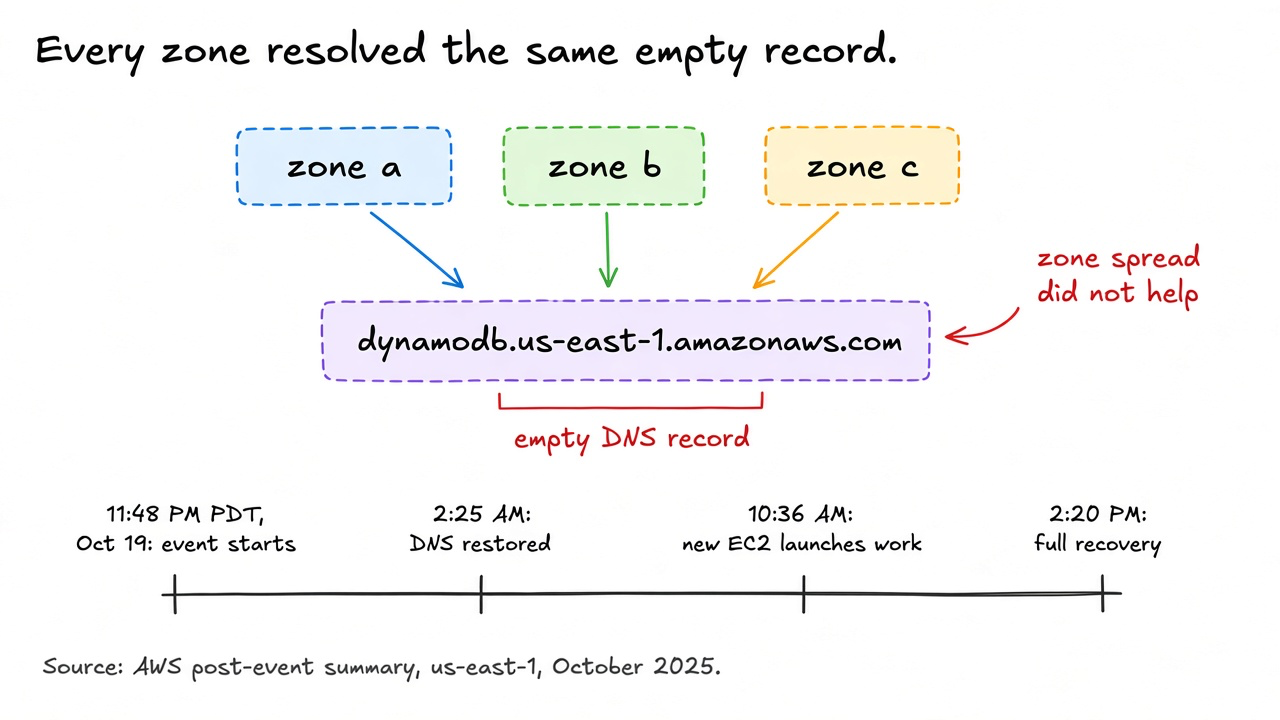
The second question is what every replica reads or resolves before it can do work. A DNS name, a secrets store, a config service, a token issuer. These rarely appear as boxes, because they feel like the environment rather than a dependency.
AWS's post-event summary for us-east-1 on October 19 and 20, 2025 is the cleanest example in public. The event began at 11:48 PM PDT on October 19. DynamoDB manages its own DNS records with an automated system. A latent race between two of its DNS Enactor processes left the regional endpoint, dynamodb.us-east-1.amazonaws.com, with an empty DNS record. Clients in every zone resolved the same name, and the name pointed at nothing. Spreading clients across zones did not help, because every zone asked the same question and got the same empty answer.
AWS restored the DNS information by 2:25 AM PDT, and clients recovered between 2:25 and 2:40 AM as cached records expired. That was not the end. EC2's DropletWorkflow Manager, which maintains leases on the physical servers that host instances, depends on DynamoDB. Its lease checks had been failing since the record went empty. When DynamoDB came back, the backlog put it into congestive collapse. New EC2 instance launches failed from 2:25 AM to 10:36 AM PDT. Network Load Balancer health checks failed between 5:30 AM and 2:09 PM PDT, because new nodes came into service before their network state had fully propagated. AWS declared full recovery at 2:20 PM PDT on October 20.
Read the timeline again with the rubric in mind. The shared name was fixed in under three hours. The systems that shared it, directly or two hops away, took about twelve more. A shared dependency does not only fail with everyone. It recovers with everyone, at the same moment, and the retry wave that follows can become its own outage.
An empty record at least fails loudly. A file that every machine accepts does not.
A config push reaches every replica at once
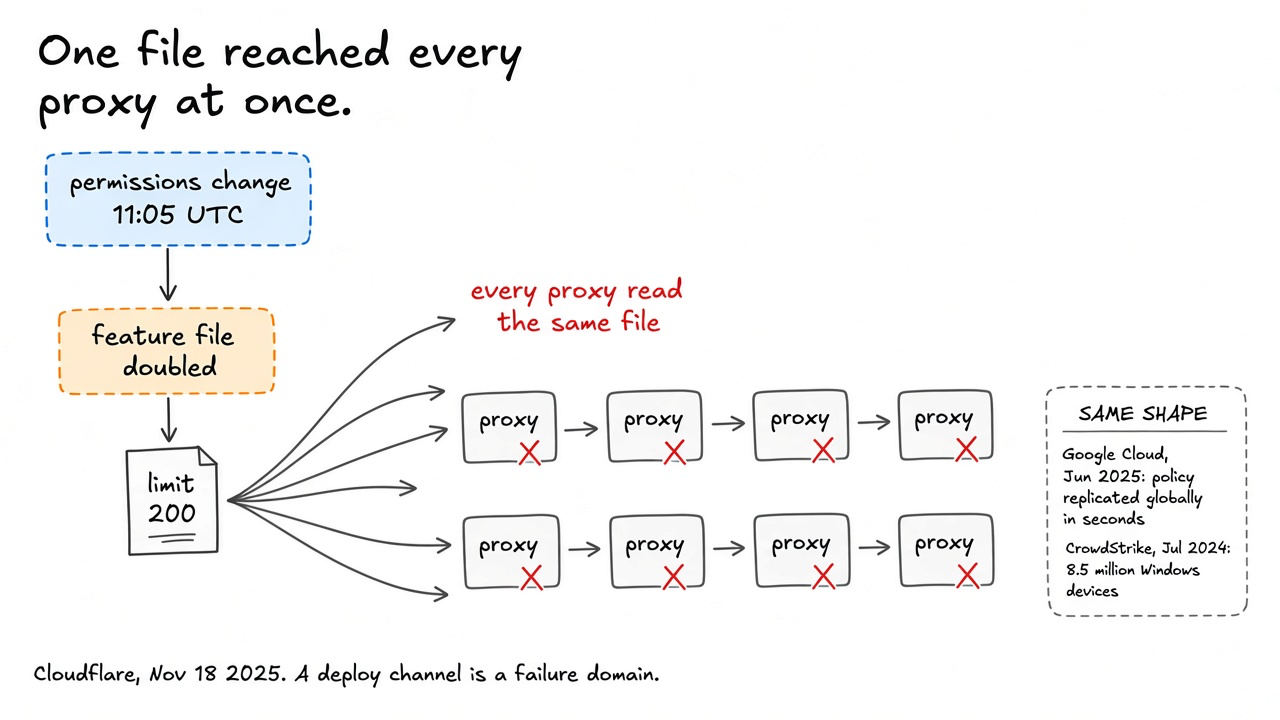
The third question is what change reaches every replica at the same time. Code deploys usually roll out in stages. Configuration, feature files, policy, and security content often do not, because they feel small and they need to move fast.
Cloudflare's report on November 18, 2025 shows the shape. At 11:05 UTC a permissions change in a ClickHouse database made a query return duplicate rows. That query builds the feature file for Bot Management. The file more than doubled in size. Cloudflare's proxy preallocates room for 200 features, against normal use of about 60, and the new file went past the limit. The file was propagated across the network, so every proxy that loaded it failed the same way. Impact began at 11:20 UTC. Core traffic was largely normal by 14:30 UTC, and all systems were normal at 17:06 UTC.
The same shape shows up across vendors. On June 12, 2025, Google Cloud inserted a policy change with unintended blank fields into Service Control's regional Spanner tables. The tables replicated it globally within seconds, and Service Control hit a null pointer. Google's report says the code path "did not have appropriate error handling nor was it feature flag protected." On July 19, 2024, CrowdStrike's Channel File 291 content update was live from 04:09 to 05:27 UTC. Microsoft estimated it affected 8.5 million Windows devices.
None of these were capacity failures. Each one was a channel that delivered the same bytes to every replica. The channel is the failure domain. Three replicas that load the same file within the same minute share it.
The fixes follow from naming the channel. Push config one failure domain at a time, and wait long enough between domains to see errors. AWS describes doing exactly this for EC2 software. Deployments follow a zonal calendar, so two zones in the same Region receive a given deployment on different days. A bad deployment then breaks one zone, and gets rolled back before it reaches the next. Validate the artifact against the limits of the code that reads it, before you publish. A file that exceeds 200 features should fail in the pipeline, not in the proxy. Keep a switch that turns the consumer off. Google's report notes that a red-button for that serving path existed and rolled out within about 40 minutes. A switch that exists only in a wiki takes longer.
Staged pushes slow a bad change down. They do not keep a replica serving while the system that pushes is down.
Can your replicas keep serving while the control plane is down?
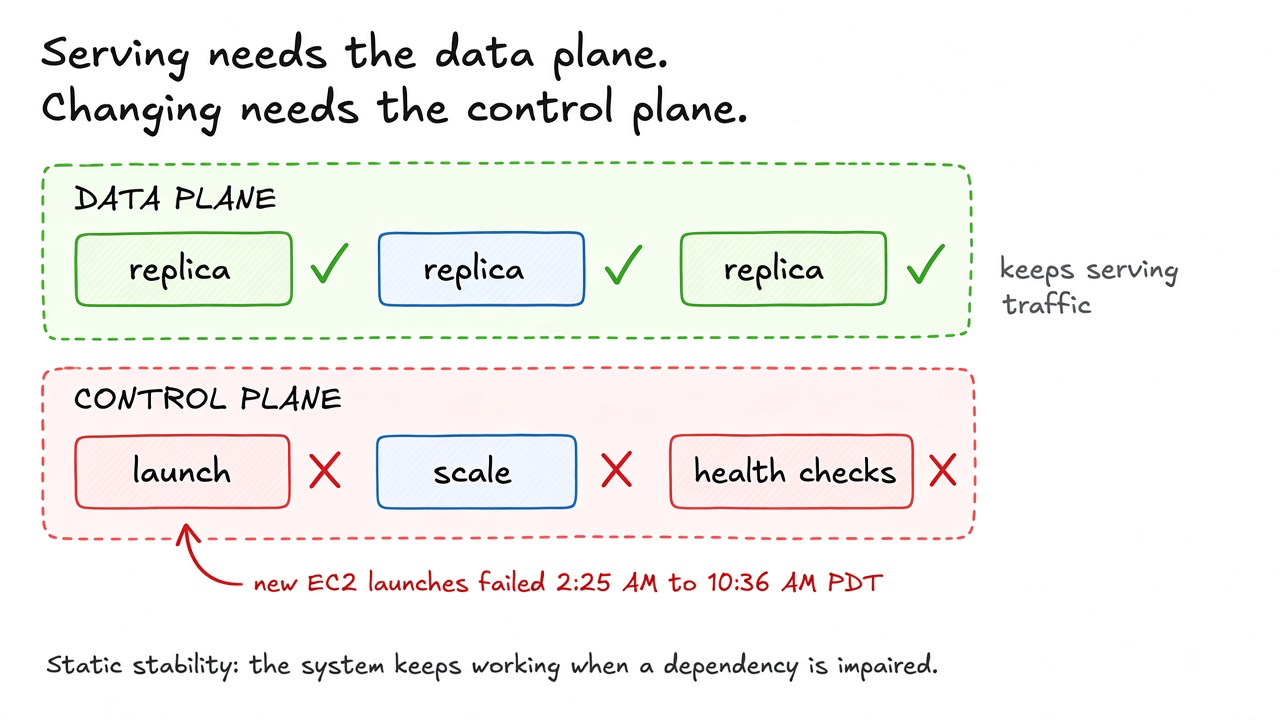
The fourth question splits every system in two. The data plane serves requests. The control plane changes the system. It launches instances, scales groups, rotates credentials, and moves traffic. Most outage plans quietly assume the control plane works during the outage.
AWS's Builders' Library has an article on this by Becky Weiss and Mike Furr, Static stability using Availability Zones. Its definition is short. In a statically stable design, the overall system keeps working even when a dependency becomes impaired. The article calls the common plan less effective. That plan deploys to several zones and expects the autoscaler to add capacity in the healthy zones when one fails. It reacts to the impairment instead of being ready for it. The statically stable version overprovisions so that it keeps operating without launching any new instance. With three zones, AWS overprovisions by 50 percent, so each zone runs at only 66 percent of the load it was tested for. Lose one zone, and the other two carry the full load with the instances they already have.
The October 2025 timeline shows why that matters. New EC2 launches failed for about eight hours. A plan that said "if a zone fails, the autoscaler replaces the capacity" needed the one thing that was broken. A plan that already ran enough replicas in the surviving zones needed nothing.
Score this question by reading your runbook for the zone-loss case. Circle every step that creates, resizes, or reconfigures something. Each circle is a control-plane dependency. Then ask how long the service survives if every one of those steps fails. If the answer is "until the queue fills," you have your number.
Static stability costs money. A third of every zone's tested capacity sits idle on a normal day. That is the trade. You pay in idle instances, or you pay in the hours your control plane is down.
All of this assumes you know what your providers depend on.
Your vendor's vendor sits inside your failure domain
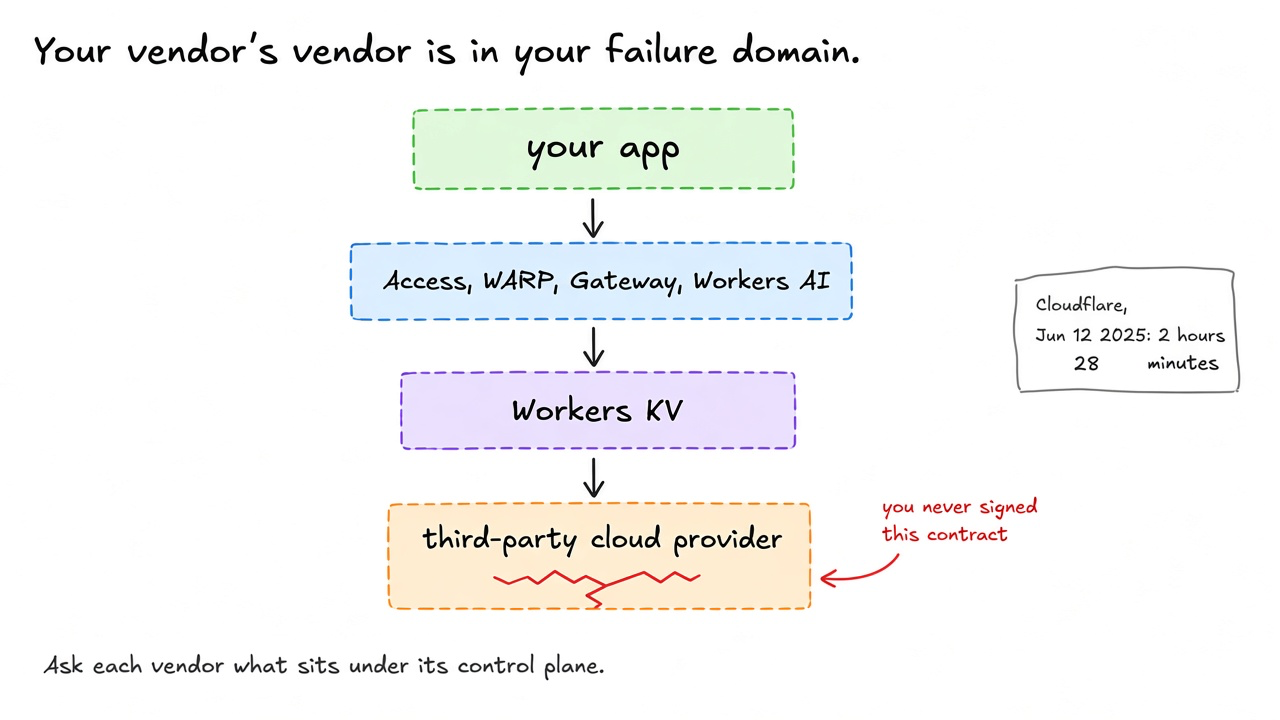
The fifth question is what sits under the services you buy. A managed service has its own shared boxes, and they become yours the day you depend on it.
Cloudflare's report on June 12, 2025 is unusually direct about this. Workers KV kept its central store with a third-party cloud provider. When that provider failed, Workers KV failed, and so did the Cloudflare products built on it. The report lists Workers KV, WARP, Access, Gateway, Images, Stream, Workers AI, Turnstile and Challenges, AutoRAG, Zaraz, and parts of the dashboard, among others. The impact lasted 2 hours and 28 minutes, from 17:52 to 20:28 UTC. Cloudflare's DNS, cache, proxy, and WAF were not directly affected.
A team running three replicas behind Cloudflare Access, in three zones of a different cloud, would have watched staff logins through Access fail for that window. Nothing on their diagram was down. The shared box was two contracts away.
You cannot audit every vendor's architecture. You can ask three questions in every vendor review and write down the answers. Which of your services depend on a single provider or a single region? Which of them stay up if your control plane is down? Which incident reports have you published, and what did they change? A vendor that publishes reports like Cloudflare's and AWS's is giving you the material to score them. A vendor that does not is asking you to assume independence.
The newest replica set on most diagrams is not a service at all.
An agent loop with one model behind it
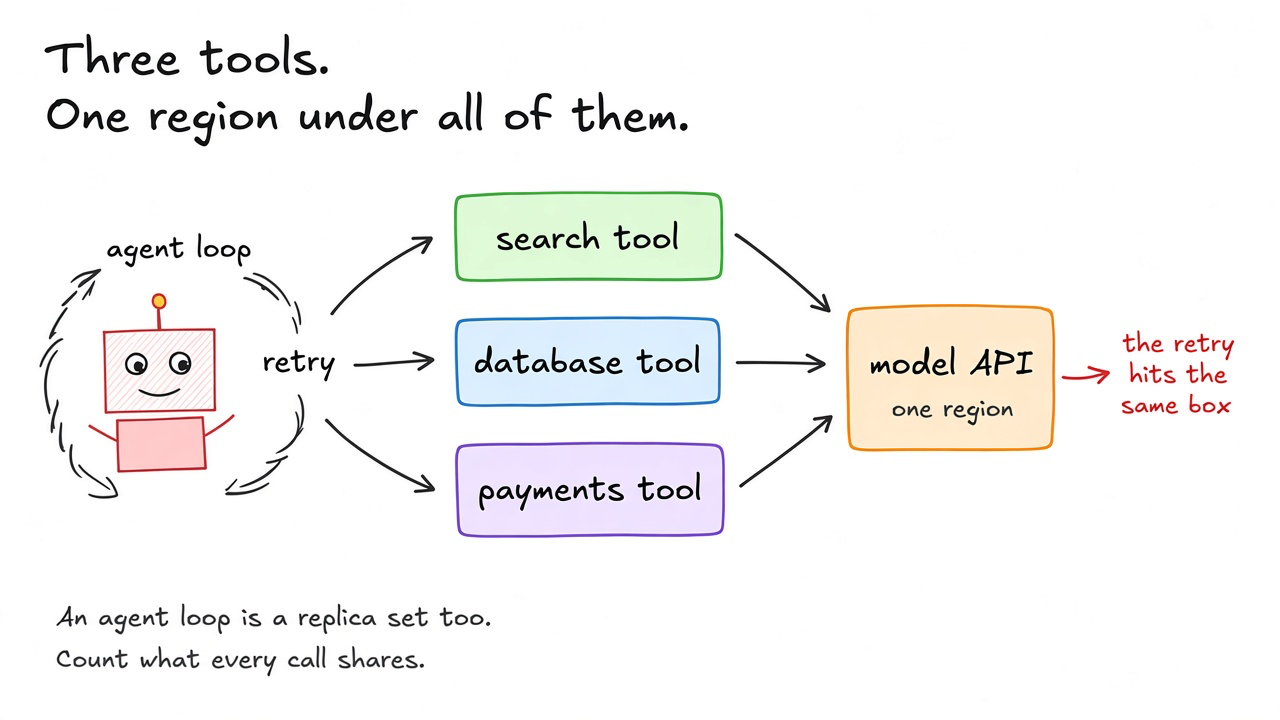
An agent is a loop. The model reads the context, picks a tool, the application runs the tool, and the result goes back to the model. Teams make the tools redundant. The search service has replicas, the database has a standby, and the payments client retries. Then every step of the loop goes back through one model endpoint, in one region, under one API key with one quota.
Score the loop with the same five questions.
- One copy. Count model endpoints, regions, and keys. One of each is one copy.
- Read at startup. The prompt, the tool schemas, and the credentials the loop loads. If a bad schema ships to every worker at once, every loop fails the same way.
- Reaches everyone at once. A prompt change or a model version change is a config push. Stage it the way you would stage a feature file.
- Control plane. Rate limits and quota changes are the provider's control plane. Your loop depends on it every turn.
- Vendor's vendor. Ask where your model provider runs, and which of its regions share infrastructure.
The retry inside the loop deserves its own line. When the model endpoint slows down, a loop that retries every failed step multiplies the load on the one box that is already struggling. That is the same congestive shape as the DynamoDB recovery, at a smaller scale. Give the loop a budget of steps and of wall-clock time, and give it a way to stop and hand the task back to a person or a plain code path. A loop that cannot stop is not redundant. It is a second load generator pointed at your shared box.
You now have five questions and seven examples. Use them on a real diagram.
Score your diagram this afternoon
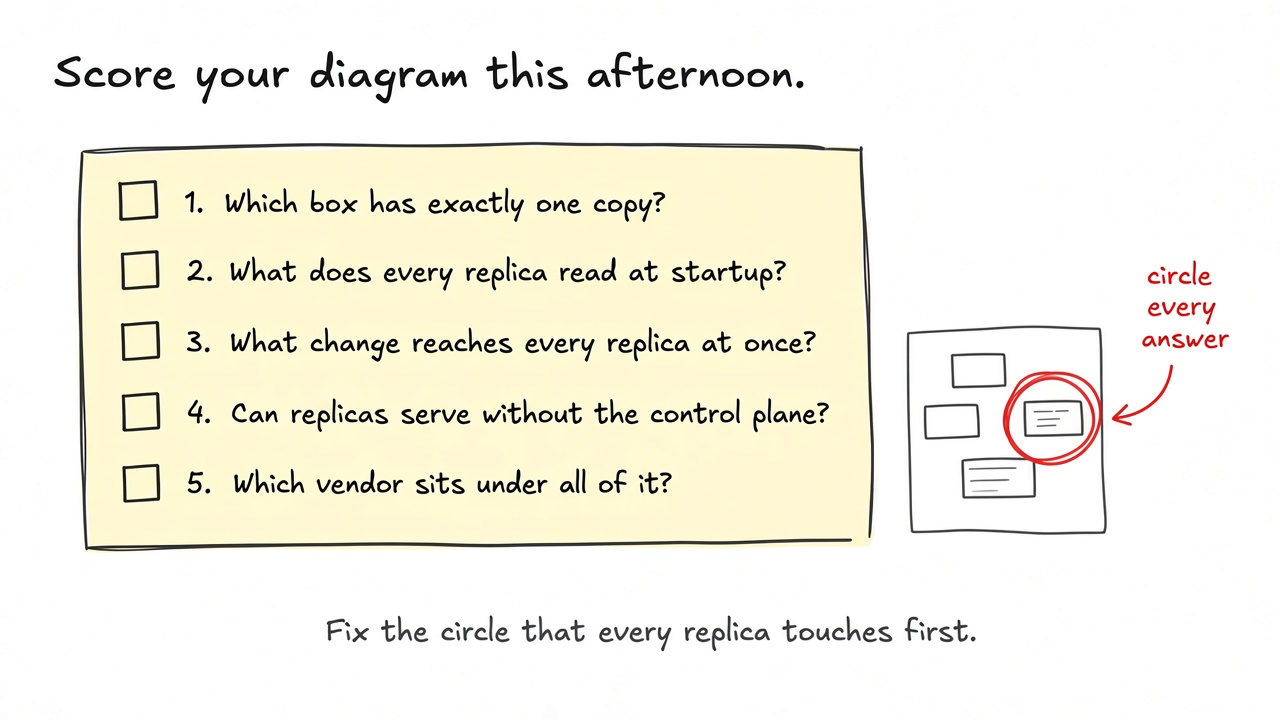
Print the diagram for the service you would least like to be paged about. Take a red pen. Answer each question by circling something on the paper.
| Question | Circle this | First fix |
|---|---|---|
| Which box has exactly one copy? | Any box with a count of one, including NAT gateways and load balancers | A second copy in a different zone, with routes that keep zones apart |
| What does every replica read at startup? | DNS names, secrets stores, config services, token issuers | A cached last-known-good value the replica can start with |
| What change reaches every replica at once? | Config, feature files, policy, prompts, security content | A staged rollout by failure domain, plus validation against the consumer's limits |
| Can replicas serve without the control plane? | Every runbook step that launches, scales, or reconfigures | Enough running capacity to lose one zone without launching anything |
| Which vendor sits under all of it? | Managed services whose own dependencies you have not asked about | A written answer from the vendor, or a fallback that skips them |
Most diagrams end with a few circles. Look for the circle that every replica touches. That is the one setting your real availability, whatever the slide says. Fix that one before you add another replica, and recompute the number with Availability using its real uptime.
Then put the circled diagram in the design review where people can see it. The next person who adds a replica will know what the replica shares.
Comments
Join the discussionNo comments yet. Be the first to comment.